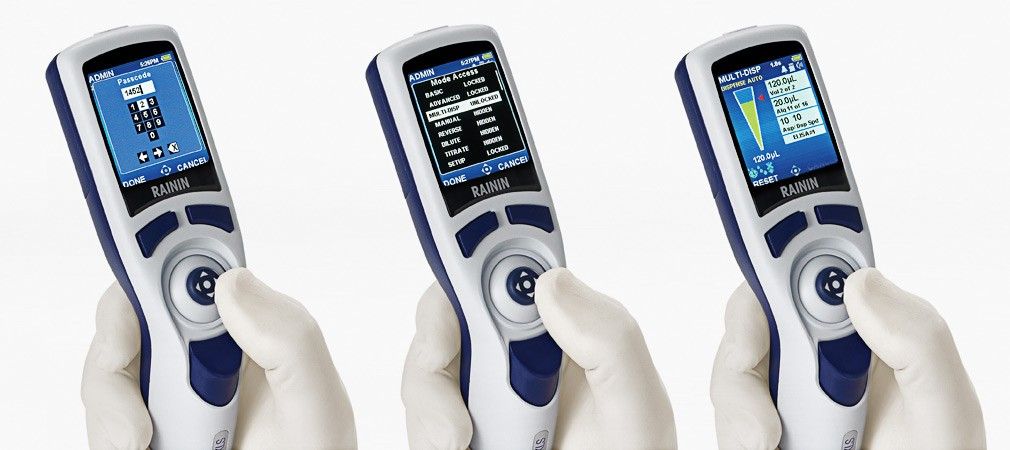

The cushioned joystick control of the E4 XLS+ electronic pipette makes it easy to configure and run protocols. Get consistent volume and identical speed for every step. Measure precise volumes in Manual mode and dispense multiple aliquots in Multi-dispense. Automate cycle counting so you can concentrate on other details, and relieve your thumb with options to auto-mix or auto-dispense. It's easy to store settings so you can duplicate an assay later.
Ergonomic Pipette
Lightweight and designed for use with either hand, the E4 XLS+ fits like a glove and is extraordinarily well balanced while pipetting. The carefully shaped fingerhook enables a relaxed grip. Extremely light operating forces and a silicone shock absorber built in to the tip ejector make the E4 a pleasure to work with. On LTS-equipped models, tip ejection force is just 0.6 kg.
Compliant Pipette
To accommodate GLP/GMP compliance, the E4 makes it possible to password-protect pipette settings, protocols and service alarms. Service records, cycles and status data are completely tamper proof.
Your data is everything. Trust the E4 XLS+ pipette to deliver!

All piston movements are controlled by the onboard microprocessor, which moves the piston the set distance at the set speed, regardless of user. The advanced stepper motor has 4,000 discrete steps, providing highly precise liquid measurements. At the end of each pipetting cycle the E4 XLS+ re-calibrates itself by resetting the zero point.

No manual required! The E4’s large color screen, carousel navigation and joystick control make operation easy and highly intuitive. From straightforward pipetting to complex applications, this tool can do it all. Its long-life battery gives a day’s worth of pipetting with minimal charging and will last for thousands of recharges.
The E4s’ Admin Mode enables you configure the pipette any way you want. For convenience or security, remove unwanted modes or lock in settings. Create personalized setting profiles to “re-set” your pipette to a preferred configuration.
Purify biomolecules from proteins to oligonucleotides to chromatin using E4 XLS+ adjustable spacer pipettes and Rainin’s PureSpeed™ tips. Unite rapid and gentle processing of multiple samples with high elution concentration for an unbeatable combination! All E4 have the PureSpeed functionality pre-installed.

Reduce compliance risks! Onboard service data is extremely secure and quick to access. Avoid calibration compliance errors by password protecting access to service interval alarms. Minimize pipetting SOP deviations by locking protocol settings.
Store multiple custom protocols in the on-board memory. Simultaneously review and select your protocols with a simple movement of the joystick. No more re-entering preferred protocols over and over again!
Purify biomolecules from proteins to oligonucleotides to chromatin using E4 XLS+ adjustable spacer pipettes and Rainin’s PureSpeed™ tips. Unite rapid and gentle processing of multiple samples with high elution concentration for an unbeatable combination! All E4 have the PureSpeed functionality pre-installed.

In Basic, you can:
Sections in this video:
Basic Mode In Basic, you can aspirate and dispense a volume, control aspiration and dispense speed. Sections in this video: Set a volume and set speed. View Quick Help. Aspirate and dispense. Turn off the pipette. Press either button below the screen to switch on the pipette. It always starts up in Basic Mode. Set a volume and set speed. To adjust volume or speed, move the joystick to the right. Note that the box around volume is illuminated. For all settings on this pipette, if a box is outlined like this, you can press the joystick in and then make changes. Press the joystick in. On this volume pipette, left and right decrease and increase volume by 10 microliters. Up and down change it by two-tenths. For any setting, left and right make larger jumps, while up and down adjust in smaller increments. Press the joystick in to set the volume. The outlined box moves down to the next setting, speed. Press the joystick in to change the speed for aspirate and dispense. In basic mode, one speed controls both. Speeds can be controlled separately in other modes, like advanced. Press Done to set the speed, and press Done again to run the volume. View Quick Help. A quick refresher on the basics of operating this pipette is available by pressing the button under Help. Aspirate and dispense. Joystick up to aspirate. Joystick down to dispense. Turn off the pipette. To turn the pipette off, press the left button, main, and move the joystick to level 2. Push the joystick up and joystick to the power off icon and push the joystick up. Push the left button, continue, on the shutdown screen and the pipette powers off. You can adjust the sleep timeout setting in setup mode. Sleep Timeout automatically shuts off the pipette after a set number of minutes.
In Manual, you can:
Sections in this video:
Manual mode. In manual, you can measure the volume of a sample, start or stop aspiration or dispense from any point, actuate volume in precise motor controlled steps. Sections in this video: Basic Manual Pipetting, Aspirate or Dispense in Micro Steps, Measure a Volume, Set and Use Fixed Volumes, Use the Cycle Counter. Press either button above the joystick to turn on the pipette. Then press the button on the left, main. Move the joystick right or left to navigate to manual, and push the joystick up to choose it. Basic Manual Pipetting Push the joystick up to aspirate. Manual mode makes it possible to continuously and incrementally actuate volume control. Nudge the joystick down, then nudge it up, push downward and hold to completely dispense. Joystick right to go into settings. The volume box is lit. Press the joystick in to make changes. Left and right adjust by 10 microliters. Up and down by two tenths. Press the joystick in to set. Move down to speed and press. Both aspirate and dispense use the same speed in manual mode. Left and right decrease or increase it by five, and up and down by one. Press done to set, and press done again to run the volume. Push and hold the joystick up to fully aspirate. Hold down to dispense completely. Aspirate or dispense in micro steps. Aspirate a volume and stop. Note "Step" on the button on the right. With the arrow pointed up, press that button to raise the volume in steps of two-tenths. Flick the joystick down a quick stroke to switch the button so it lowers the volume in steps of two-tenths. Aspiration is responsive from any starting point. Joystick downward and hold to dispense. Press reset on the left to begin a new cycle. Measure a volume. Take a look at the sample in the container and slightly overestimate its size. If this is your first time estimating a volume inside this type of container, take a moment to familiarize yourself with how different volumes look by dispensing a few volumes into it and noting the levels. Push right to go into Settings, joystick up to Volume and press in. Set the volume to your slightly high estimate. Adjust speed and press done to exit and run the volume. Push and hold the joystick up to aspirate. If you estimated correctly, aspiration should include a small portion of air at the tip. Press the button on the right to step down in two-tenth increments. Watch the tip closely and continue stepping down until the air is gone, with liquid poised to exit the opening. Note the volume of your sample. Joystick down to clear the pipette. When the tip is empty, press reset. Set and use fixed volumes. Press the button on the right, Options. Press the joystick in to turn fixed volumes on, green, then push done on the left. Joystick right to go into settings, and press the joystick in to open a list of fixed volumes. Joystick to the last fixed volume you want to set, then press the right side button. End volume. Joystick to a volume and press the joystick in, then joystick left or right, up or down to adjust the volume. Press in to set that volume and move to another. When each volume is set, press Done again to exit the fixed volumes list. You can adjust cycle speeds or press Done to exit settings and run the first volume, joystick up to aspirate and down to dispense. When complete, press Reset, joystick right, joystick to your next volume and press Done. PRESS DONE again, joystick up to aspirate and down to dispense. When complete, press RESET, then OPTIONS, and press the joystick in to turn off fixed volume. Turn the cycle counter on or off. Use the cycle counter to let the pipette record progress during an experiment. In OPTIONS, joystick down to the second option. Press the joystick in to turn cycle counter on. Press done to exit and joystick right to go into settings. Adjust volume and speed settings as you wish. Joystick down to the cycle count box and press the joystick in to adjust the setting. You can use the joystick to change the number or press reset to set the cycle count number to zero. Aspirate and dispense and notice the cycle counter registering each cycle.
Using Multi-Dispense, you can:
Sections in this video:
Multi-Dispense. Using Multi-Dispense, you can dispense a series of equal or unequal volumes from just one aspiration. Fill plates faster, especially with a multi-channel pipette, and reduce hand strain by using time dispense. Sections in this video: Basic Multi-Dispense Use and Save a Fixed Volume Dispense a Series of Unequal Volumes Automatic Dispense with Auto-Pace Joystick Blowout On-Off Press either button above the joystick to turn on the pipette. Then press the button on the left, main. Move the joystick right or left to navigate to Multi-Dispense, and push the joystick up to choose it. Basic Multi -Dispense Push right to go into settings. Aliquot volume is lit. Press the joystick to select. On this volume pipette, push right to increase or left to decrease by 10 microliters. Push down or up to change by 2 tenths of a microliter. Press the joystick to set the volume. Joystick down once and press the button to select aliquots. Push to set. Joystick down again and push the button to change cycle speeds. Up and down change speed by one. Left or right move it up or down by five. Push done to set. Push done again to begin. Push the joystick upwards to aspirate and downwards to dispense each aliquot. To blow out residual volume, press Blow Out. Save and work with a fixed volume. To multi-dispense a fixed volume that you can save and return to, press the button on the right, Options. Press the joystick button to turn fixed volume on, then press Done on the left. Joystick right to go into settings, push up to the FIX aliquot volume box, and press the joystick button to open a list of fixed volumes. Joystick to any fixed volume you want to set, then press the right side button, END VOLUME. Press the joystick button to highlight, then joystick left or right, up or down, to adjust the volume. Press the joystick button again to set the volume. Press Done to exit the fixed volumes list. Back on the settings screen, you can adjust number of aliquots or cycle speeds. Press Done when you're ready to run the volume. Joystick up to aspirate and down to dispense each aliquot. Press the blowout button to clear the pipette tip. Dispense a series of unequal volumes. To multi-dispense a series of different volumes, press the button on the right, OPTIONS. Press the joystick button to turn off fixed volume, if on, then joystick down to volume sequencing and press once to turn it on. Press DONE on the left. Joystick right to go into settings and up to highlight the aliquot volumes box. Press the joystick button and the sequence volumes list opens. Joystick to the last number of volumes you want to dispense, then press N Volume on the right. Now move to an aliquot volume you want to adjust. Press the joystick button. Adjust the amount with left, right, up, or down movement and press the joystick button again to set. When each volume in the sequence is set, press Done. Back on the settings screen, you can adjust cycle speeds or press the left button, done, to run the volume sequence. Joystick up to aspirate and down to dispense each aliquot. Press the right button, blow out, to clear the tip. Auto Pace Automatic Dispense To let the E4 multi-dispense automatically at regular time intervals so you don't have to move the joystick down each time, press Options. Move to Auto Pace and press the joystick button to highlight it. Move the joystick right, left, up or down to adjust the time interval between each dispense. Then press Done. Both fixed volume and volume sequencing can work with Auto Pace. Turn on or leave off as needed and press done again to run the multi-dispense. Move the joystick up to aspirate, then move it down once to begin the timed series of dispenses. Press blow out to clear the tip. Joystick blow out on off. If you would like to use a final joystick down to blow out, you can do that by default. If you would rather block this function, press Options and joystick down to joystick blowout. Press the joystick button to turn it on or off. When off, you will see a blue X icon in the lower left of the control screen. The joystick now cannot be used to blow out the tip. Turn joystick blowout back on by pressing Options, selecting Joystick Blowout and turning it on (green).
In Advanced Mode, you can:
Sections in this video:
ADVANCED MODE In advanced mode, you can Mix automatically. Track your work with the cycle counter. Dispense different volumes sequentially. And turn blowout on or off. SECTIONS in this video: Adjust volume, aspirate and dispense speeds. Use and save fixed volumes. Dispense stored volumes sequentially. MIX. TURN BLOWOUT ON or OFF. And use the cycle counter. Press either button above the joystick to turn on the pipette, then press the button on the left, main. Move the joystick right or left to navigate to advanced, and push the joystick up to choose it. Adjust volume, aspirate and dispense speeds. Move the joystick right to go into settings. The volume box is lit. Press the joystick in. On this volume pipette, left and right decrease and increase volume by 10 microliters. Up and down change it by two-tenths. Press the joystick in to set it. Now the aspiration dispense speed box is lit. Press the joystick in to open cycle speeds and press it again to select and adjust either speed. Left and right decrease or increase the speed by five. Up and down increase or decrease by one. To exit, press Done. Press Done again to exit settings and run the cycle up to aspirate and down to dispense. Use and save fixed volumes. Press the button on the right, Options. Press the joystick in to turn fixed volumes on (green), then push done on the left. Joystick right to go into settings, then push up to the fixed volume 1 box and press the joystick in to open a list of fixed volumes. Joystick to the last fixed volume you want to set, then press the right side button, end volume. Joystick to a volume and press the joystick in, then joystick left or right, up or down to adjust the volume. Press done to set that volume and move to another. When each volume is set, press done again to exit the Fixed Volumes list. You can adjust cycle speeds or joystick left to exit settings and run the first volume. Joystick up to aspirate and down to dispense. When complete, joystick right. With the fixed volume one box lit, press the joystick in. Joystick to your next volume and press done to exit. Press done again joystick up to aspirate and down to dispense. When complete, joystick right. Press the joystick in. Joystick to your next volume and press done to exit. Joystick left, up to aspirate, and down to dispense. Press Options, and press the joystick in to turn off fixed volume. Dispense stored volume sequentially. Dispense volumes in a series, without returning to the list of volumes between each cycle. In Options, joystick to volume sequencing and press the joystick in to turn it on. Press done. Joystick right to go into settings. And with the top box lit, press the joystick in. A list of sequence volumes opens. Joystick to the last volume you want to dispense and press end volume. Use the joystick to go to different volumes, press it to select a volume, and adjust by moving left, right, up, or down. When volumes are set, press done. Press Done again to begin the volume sequencing. Joystick up to aspirate and down to dispense. Repeat through each volume in the sequence. Press Options and press the joystick in to turn off volume sequencing. Mix. In Options, joystick to mix and press the joystick in to turn it on. Press Done. Joystick right to go into settings. You can adjust volume, cycle speeds, including mix speed, and finally, mix settings. With the bottom box lit, press the joystick in. Press the joystick again to highlight mix volume. Move left or right, up or down. Press Done. Move down to Cycles, press the joystick in and set the number of mix cycles. Manual means the pipette will mix continuously until you release the joystick to stop it. Press Done to exit mix settings. Then press Done again to exit settings and run the volume. Joystick up to aspirate, down to dispense, and continue holding down if using manual mix. To halt, release the joystick upward. To mix a set number of cycles, joystick right to go into settings, select the Mix Settings box, select Cycles, and select the number of cycles. Press Done to exit Mix Settings, and press Done again to exit settings and run the volume. Joystick up to aspirate. Release the joystick after the quick down motion and mix is performed automatically the set number of cycles. Press OPTIONS and press the joystick in to turn off Mix. Turn blowout on or off. In OPTIONS, joystick to blowout and press the joystick in to enable or disable blowout. Turn the cycle counter on or off. Use the cycle counter to let the pipette record progress during an experiment. In Options, joystick down to the second screen of options, press the joystick in to turn cycle counter on, press done to exit, and joystick right to go into settings. Adjust volume and speed settings as you wish. Joystick down to the cycle count box and press the joystick in to adjust the setting. You can use the joystick to change the number or press reset to set the cycle count number to zero. Aspirate and dispense, and notice the cycle counter registering each cycle.